
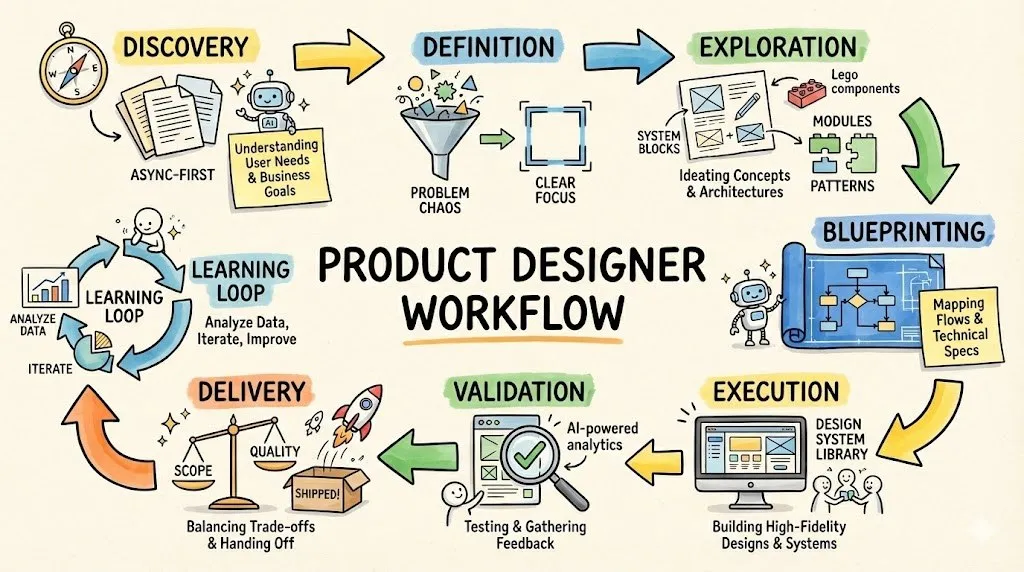
Workflow Modes
One system, different speeds.
Same workflow, different fidelity — never different principles.
| Mode | Typical Use Case | What's Compressed |
|---|---|---|
| Strategic | Platform, OS-level, cross-product | Full workflow, deep system design |
| Standard | Feature delivery | Full flow, scoped depth |
| Lite | Growth experiments, small UX fixes | Lighter discovery, fast validation |
"Full flow" ensures the end-to-end user experience is complete and unbroken, even in fast or lightweight projects. "Full workflow" ensures the design process itself is intentional, systemized, and learnable — required for platform-level or strategic initiatives.
Principles
Four commitments that don't compress.
This workflow reflects our 2026 direction: global collaboration, AI-native product strategy, system-based thinking, and async execution at scale.
1. Async-First Collaboration
- Work happens in documents first, not meetings.
- Meetings are for decision-making, not information transfer.
- Default tools: Notion, FigJam, Figma, Loom, Slack.
2. AI-Native By Default
- AI is embedded across the workflow to accelerate research, synthesis, exploration, validation, and learning.
- AI never replaces judgment — it compresses cycles.
- Designers own intent, trade-offs, and final decisions.
3. System-Based, Not Screen-Based
- We design experience systems, lifecycle models, behavior rules, and reusable components.
- Screens are outputs, not the goal.
4. Global Team, Low-Misunderstanding Communication
- Explicit writing over implicit assumptions.
- Clear ownership and decision logs.
- Artifacts over opinions.
Stage 1 · Discovery
Shared understanding before design.
Goal: Align on the real problem before touching solutions.
Tools
- FigJam — collaborative framing
- Notion — async review & context
- AI Research Assistant (GPT / Gemini) — synthesis
- Loom — async context
- Slack Threads — Q&A
Activities
- JTBD framing
- Task universe mapping
- Persona & lifecycle analysis
- Research input gathering
- Competitive teardown (AI-assisted clustering)
- Problem articulation
Deliverables
- Problem Framing Canvas
- Research Inputs Wall
- AI Competitive Summary
- Stakeholder Alignment Note
- North Star Definition
AI speeds up research, async tools reduce meetings, FigJam drives alignment.
✅ Stage Gate — Discovery Exit
Exit Criteria
- Problem & non-goals are explicit
- North Star agreed
Decision Owner
- PM — problem scope
- Design — experience framing
Stage 2 · Definition
From insights to direction.
Goal: Turn ambiguity into design intent and boundaries.
Tools
- FigJam — IA & concept models
- AI Synthesis (GPT / Gemini) — pattern detection
- Notion — scope & definition docs
- Loom — async walkthroughs
Activities
- Insight consolidation
- Task prioritization (value × frequency)
- Concept model creation (e.g. Lifecycle Engine)
- IA drafting
- Data dependency identification
- Behavior rule hypotheses
Deliverables
- Concept Model v1
- IA v1
- Behavior Rule Draft
- Scope Definition
AI helps compress insights → patterns faster.
✅ Stage Gate — Definition Exit
Exit Criteria
- Clear experience strategy
- Boundaries & assumptions documented
Decision Owner
- Design — experience direction
- PM — scope & sequencing
Stage 3 · Exploration
System primitives, not pixels.
Goal: Explore broadly using system primitives, not pixels.
Tools
- Figma Make — structured exploration
- Design System Tokens
- AI Design Assistant (GPT / Gemini) — layout suggestions, state variations
- FigJam — async feedback on early options
Activities
- System-first wireframing
- Layout explorations
- Multi-lifecycle variants
- Cross-channel consistency checks
- Low-fi prototypes
Deliverables
- Wireframes
- Component proposals
- Interaction sketches
AI quickly generates multiple variations — designers curate and refine.
Stage 4 · Blueprinting
Remove ambiguity before execution.
Goal: Remove ambiguity before hi-fi execution.
Tools
- FigJam — flows & logic
- AI Flow Generator (GPT / Gemini) — generate drafts
- Notion — acceptance criteria
- Slack Threads — Eng/PM Q&A
Activities
- End-to-end flow definition
- Personalization & behavior rules
- Data requirement mapping
- Feasibility alignment
- Edge case clarification
Deliverables
- Experience Blueprints
- Behavior Rule Spec
- Data Map
- Acceptance Criteria
Blueprinting eliminates 80% of preventable rework.
Blueprinting eliminates 80% of preventable rework.
Stage 5 · Execution
Polished, systemized UI.
Goal: Deliver high-quality, reusable UI with confidence.
Tools
- Figma Make — hi-fi systemized UI (DS-bounded)
- Design System — tokens, primitives, patterns
- Loom — async walk-throughs for PM/Eng
- Slack — design reviews
Activities
- Hi-fi UI design
- Responsive layouts
- Micro-interactions
- DS updates
- Review cycles
Deliverables
- Hi-Fi Screens
- Prototypes
- Redlines
- Component variants
Designer owns quality — AI accelerates precision, not judgment.
Stage 6 · Validation
De-risk before shipping.
Goal: Validate usability, clarity, and value.
Tools
- FigJam — test planning & synthesis
- Maze — unmoderated usability testing to quickly validate task completion, clarity, and friction at scale
- Moderated testing — facilitated sessions to observe user behavior and probe mental models, language understanding, and perceived value
- AI Interview Summaries — speed up synthesis
- Loom — async review of findings
Activities
- Test planning
- Usability testing (unmoderated + moderated)
- Insight synthesis
- Issue prioritization
Deliverables
- Findings report
- Insight clusters
- Priority matrix
- Iteration plan
AI summarization reduces analysis time from days to hours.
Stage 6.5 · Trade-off Decision
What we ship vs. defer.
Goal: Make conscious decisions under constraints.
Deliverable — Trade-off Log
- What we learned
- What we fix now
- What we defer (and why)
- Risks accepted
Decision Owner: PM + Design
Stage 7 · Delivery
Zero confusion at handoff.
Goal: Enable engineering to ship without confusion.
Tools
- Figma Make → Spec mode
- Notion → Handoff packet
- Loom → Async walkthrough
- Slack threads → Q&A log
Deliverables
- Final UI
- Behavior rules
- Analytics events
- Edge states
- QA checklist
Expect "zero confusion" at handoff — engineering ships without a single clarification meeting.
Stage 8 · Post-Launch
Close the loop.
Goal: Turn releases into system improvements.
Tools
- AI Data Insights (GPT / Gemini)
- FigJam — insights wall
- Notion — decision log updates
- Loom — async review with PM
Activities
- Post-launch analysis
- Merchant feedback synthesis
- DS updates
- V2 opportunity discovery
Deliverables
- Post-launch insights
- Updated assumptions
- Component graduation proposals
- V2 opportunity board
We design a system, not just features.
🔁 Learning Loop
- Concept Model → updated
- Behavior Rules → refined
- Components → promoted or deprecated
We don't design features. We design systems that learn.